
模型
Qwen2.5-14B-Instruct-AWQ 是阿里云 Qwen2.5 系列中的一个14B(140亿参数)指令微调大语言模型的4bit AWQ量化版本,专为高效推理部署优化,在保持较强的中文、英文理解与生成能力的同时,大幅降低显存占用与计算成本,适合在单卡GPU(如4090/5090)上进行高性能推理部署,广泛用于对话、代码生成、信息抽取和Agent应用场景。
前置环境
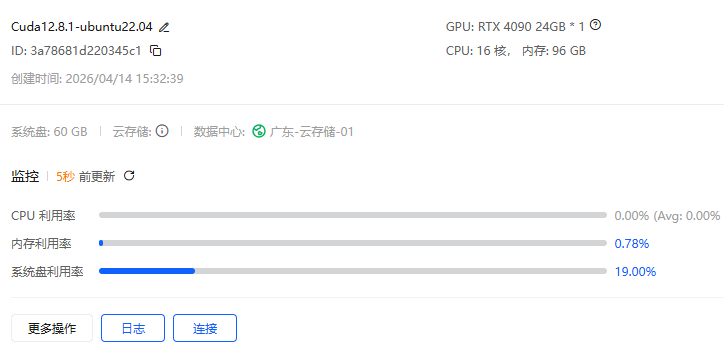
租用4090gpu https://ppio.com cuda12.8.1版本
安装conda
下载
wget https://repo.anaconda.com/miniconda/Miniconda3-latest-Linux-x86_64.sh
安装
安装过程中注意:
一路回车
看到 Do you accept the license? 输入 yes
安装路径默认即可(或 /root/miniconda3)
bash Miniconda3-latest-Linux-x86_64.sh
安装完成后执行:
source ~/.bashrc
安装虚拟环境
创建conda依赖文件 vllm016.yml
name: vllm016
channels:
  - defaults
dependencies:
  - _libgcc_mutex=0.1=main
  - _openmp_mutex=5.1=1_gnu
  - bzip2=1.0.8=h5eee18b_6
  - ca-certificates=2026.3.19=h06a4308_0
  - ld_impl_linux-64=2.44=h9e0c5a2_3
  - libexpat=2.7.5=h7354ed3_0
  - libffi=3.4.4=h6a678d5_1
  - libgcc=15.2.0=h69a1729_7
  - libgcc-ng=15.2.0=h166f726_7
  - libgomp=15.2.0=h4751f2c_7
  - libnsl=2.0.0=h5eee18b_0
  - libstdcxx=15.2.0=h39759b7_7
  - libstdcxx-ng=15.2.0=hc03a8fd_7
  - libuuid=1.41.5=h5eee18b_0
  - libxcb=1.17.0=h9b100fa_0
  - libzlib=1.3.1=hb25bd0a_0
  - ncurses=6.5=h7934f7d_0
  - openssl=3.5.6=h1b28b03_0
  - packaging=26.0=py310h06a4308_0
  - pip=26.0.1=pyhc872135_1
  - pthread-stubs=0.3=h0ce48e5_1
  - python=3.10.20=h741d88c_0
  - readline=8.3=hc2a1206_0
  - setuptools=82.0.1=py310h06a4308_0
  - sqlite=3.51.2=h3e8d24a_0
  - tk=8.6.15=h54e0aa7_0
  - tzdata=2026a=he532380_0
  - wheel=0.46.3=py310h06a4308_0
  - xorg-libx11=1.8.12=h9b100fa_1
  - xorg-libxau=1.0.12=h9b100fa_0
  - xorg-libxdmcp=1.1.5=h9b100fa_0
  - xorg-xorgproto=2024.1=h5eee18b_1
  - xz=5.8.2=h448239c_0
  - zlib=1.3.1=hb25bd0a_0
  - pip:
      - aiohappyeyeballs==2.6.1
      - aiohttp==3.13.5
      - aiosignal==1.4.0
      - annotated-doc==0.0.4
      - annotated-types==0.7.0
      - anthropic==0.95.0
      - anyio==4.13.0
      - apache-tvm-ffi==0.1.10
      - astor==0.8.1
      - async-timeout==5.0.1
      - attrs==26.1.0
      - blake3==1.0.8
      - cachetools==7.0.5
      - cbor2==5.9.0
      - certifi==2026.2.25
      - cffi==2.0.0
      - charset-normalizer==3.4.7
      - click==8.3.2
      - cloudpickle==3.1.2
      - compressed-tensors==0.13.0
      - cryptography==46.0.7
      - cuda-bindings==13.2.0
      - cuda-pathfinder==1.5.3
      - cuda-python==13.2.0
      - cupy-cuda12x==14.0.1
      - depyf==0.20.0
      - dill==0.4.1
      - diskcache==5.6.3
      - distro==1.9.0
      - dnspython==2.8.0
      - docstring-parser==0.18.0
      - einops==0.8.2
      - email-validator==2.3.0
      - exceptiongroup==1.3.1
      - fastapi==0.135.3
      - fastapi-cli==0.0.24
      - fastapi-cloud-cli==0.17.0
      - fastar==0.11.0
      - filelock==3.28.0
      - flashinfer-python==0.6.3
      - frozenlist==1.8.0
      - fsspec==2026.3.0
      - gguf==0.18.0
      - grpcio==1.80.0
      - grpcio-reflection==1.80.0
      - h11==0.16.0
      - hf-xet==1.4.3
      - httpcore==1.0.9
      - httptools==0.7.1
      - httpx==0.28.1
      - httpx-sse==0.4.3
      - huggingface-hub==0.36.2
      - idna==3.11
      - ijson==3.5.0
      - interegular==0.3.3
      - jinja2==3.1.6
      - jiter==0.14.0
      - jmespath==1.1.0
      - jsonschema==4.26.0
      - jsonschema-specifications==2025.9.1
      - lark==1.2.2
      - llguidance==1.3.0
      - llvmlite==0.44.0
      - lm-format-enforcer==0.11.3
      - loguru==0.7.3
      - markdown-it-py==4.0.0
      - markupsafe==3.0.3
      - mcp==1.27.0
      - mdurl==0.1.2
      - mistral-common==1.11.0
      - model-hosting-container-standards==0.1.14
      - mpmath==1.3.0
      - msgpack==1.1.2
      - msgspec==0.21.1
      - multidict==6.7.1
      - networkx==3.4.2
      - ninja==1.13.0
      - numba==0.61.2
      - numpy==2.2.6
      - nvidia-cublas-cu12==12.8.4.1
      - nvidia-cuda-cupti-cu12==12.8.90
      - nvidia-cuda-nvrtc-cu12==12.8.93
      - nvidia-cuda-runtime-cu12==12.8.90
      - nvidia-cudnn-cu12==9.10.2.21
      - nvidia-cudnn-frontend==1.22.1
      - nvidia-cufft-cu12==11.3.3.83
      - nvidia-cufile-cu12==1.13.1.3
      - nvidia-curand-cu12==10.3.9.90
      - nvidia-cusolver-cu12==11.7.3.90
      - nvidia-cusparse-cu12==12.5.8.93
      - nvidia-cusparselt-cu12==0.7.1
      - nvidia-cutlass-dsl==4.4.2
      - nvidia-cutlass-dsl-libs-base==4.4.2
      - nvidia-ml-py==13.595.45
      - nvidia-nccl-cu12==2.27.5
      - nvidia-nvjitlink-cu12==12.8.93
      - nvidia-nvshmem-cu12==3.3.20
      - nvidia-nvtx-cu12==12.8.90
      - openai==2.32.0
      - openai-harmony==0.0.8
      - opencv-python-headless==4.13.0.92
      - outlines-core==0.2.11
      - partial-json-parser==0.2.1.1.post7
      - pillow==12.2.0
      - prometheus-client==0.25.0
      - prometheus-fastapi-instrumentator==7.1.0
      - propcache==0.4.1
      - protobuf==6.33.6
      - psutil==7.2.2
      - py-cpuinfo==9.0.0
      - pybase64==1.4.3
      - pycountry==26.2.16
      - pycparser==3.0
      - pydantic==2.13.1
      - pydantic-core==2.46.1
      - pydantic-extra-types==2.11.1
      - pydantic-settings==2.13.1
      - pygments==2.20.0
      - pyjwt==2.12.1
      - python-dotenv==1.2.2
      - python-json-logger==4.1.0
      - python-multipart==0.0.26
      - pyyaml==6.0.3
      - pyzmq==27.1.0
      - ray==2.55.0
      - referencing==0.37.0
      - regex==2026.4.4
      - requests==2.33.1
      - rich==15.0.0
      - rich-toolkit==0.19.7
      - rignore==0.7.6
      - rpds-py==0.30.0
      - safetensors==0.7.0
      - sentencepiece==0.2.1
      - sentry-sdk==2.58.0
      - setproctitle==1.3.7
      - shellingham==1.5.4
      - sniffio==1.3.1
      - sse-starlette==3.3.4
      - starlette==0.52.1
      - supervisor==4.3.0
      - sympy==1.14.0
      - tabulate==0.10.0
      - tiktoken==0.12.0
      - tokenizers==0.22.2
      - tomli==2.4.1
      - torch==2.9.1
      - torchaudio==2.9.1
      - torchvision==0.24.1
      - tqdm==4.67.3
      - transformers==4.57.6
      - triton==3.5.1
      - typer==0.24.1
      - typing-extensions==4.15.0
      - typing-inspection==0.4.2
      - urllib3==2.6.3
      - uvicorn==0.44.0
      - uvloop==0.22.1
      - vllm==0.16.0
      - watchfiles==1.1.1
      - websockets==16.0
      - xgrammar==0.1.29
      - yarl==1.23.0
prefix: /root/miniconda3/envs/vllm016
安装依赖
conda env create -f vllm016.yml
激活
conda activate vllm016
下载模型
进入存放模型的目录下执行:
git lfs install ; git clone https://www.modelscope.cn/qwen/Qwen3-8B.git
PS: 如果提示git命令错误,需要执行:
apt update && apt install -y git-lfs
验证:
运行模型
vllm serve /network/models/Qwen3-8B --served-model-name qwen3-8b --host 0.0.0.0 --port 6006 --gpu-memory-utilization 0.8 --max-model-len 12768 --api-key sk-123456 --enable-prefix-caching --reasoning-parser qwen3 --enable-auto-tool-choice --tool-call-parser qwen3_coder
参数解释:
参数 作用说明
/network/models/Qwen3-8B 必填指定本地模型文件的路径(你放模型的目录)
–served-model-name qwen3-8b 服务名称API 调用时使用的模型名,可自定义
–host 0.0.0.0 允许外部访问不限制 IP,局域网 / 公网都能访问
–port 6006 服务端口API 访问端口:http://ip:6006
–gpu-memory-utilization 0.8 GPU 显存占用上限最多使用 80% 显存,防止爆显存
–max-model-len 12768 最大上下文长度模型一次能处理的最大 token 数(12k)
–api-key sk-123456 API 密钥调用接口必须带这个 key,用于安全验证
–enable-prefix-caching 开启前缀缓存加速重复请求,大幅提升推理速度
–reasoning-parser qwen3 推理解析器专门适配 Qwen3 的思考 / 推理格式解析
–enable-auto-tool-choice 开启自动工具调用让模型自动选择是否调用工具(函数调用)
–tool-call-parser qwen3_coder 工具调用解析器适配 Qwen3 的工具调用格式
验证
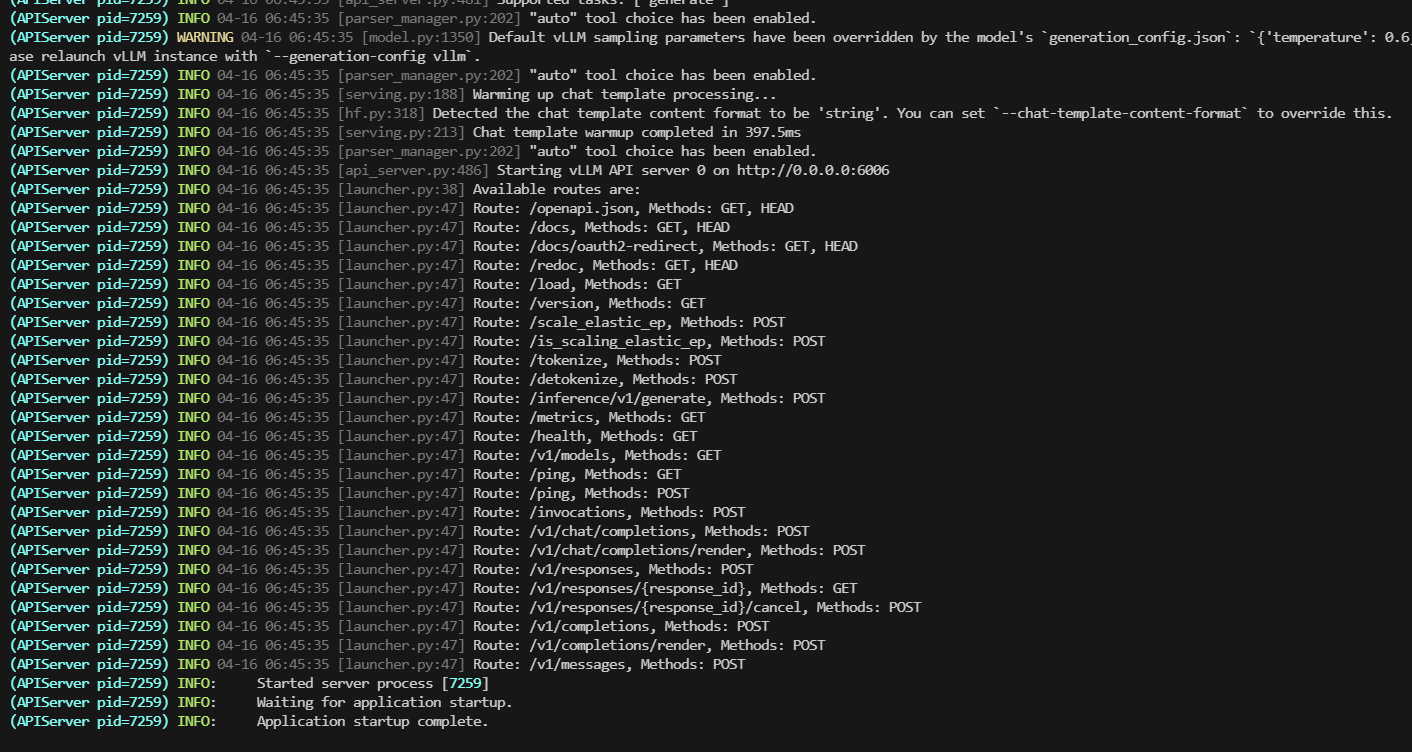
服务启动成功:
推理测试
注意: 这里存在一个问题,传递了tools tool_call列表竟然是空的
curl http://localhost:6006/v1/chat/completions   -H "Content-Type: application/json"   -H "Authorization: Bearer sk-123456"   -d '{
    "model": "qwen3-8b",
    "messages": [
      {
        "role": "user",
        "content": "帮我查一下北京天气"
      }
    ],
    "tools": [
      {
        "type": "function",
        "function": {
          "name": "get_weather",
          "description": "获取某个城市的天气",
          "parameters": {
            "type": "object",
            "properties": {
              "city": {
                "type": "string",
                "description": "城市名称"
              }
            },
            "required": ["city"]
          }
        }
      }
    ]
  }' | jq
  % Total    % Received % Xferd  Average Speed   Time    Time     Time  Current
                                 Dload  Upload   Total   Spent    Left  Speed
100  1794  100  1200  100   594    515    255  0:00:02  0:00:02 --:--:--   770
{
  "id": "chatcmpl-852181a8f1269142",
  "object": "chat.completion",
  "created": 1776322054,
  "model": "qwen3-8b",
  "choices": [
    {
      "index": 0,
      "message": {
        "role": "assistant",
        "content": "\n\n<tool_call>\n{\"name\": \"get_weather\", \"arguments\": {\"city\": \"北京\"}}\n</tool_call>",
        "refusal": null,
        "annotations": null,
        "audio": null,
        "function_call": null,
        "tool_calls": [],
        "reasoning": "\n好的,用户让我帮他查一下北京的天气。我需要调用get_weather这个函数。首先,确认函数的参数是城市名称,所以我要提取用户提到的“北京”作为参数。然后检查是否有其他可能的参数,但根据工具定义,只有city是必需的。确保参数正确无误,没有拼写错误。接下来,生成对应的tool_call结构,把城市名称填进去。最后,确认返回的JSON格式正确,没有语法错误。这样用户就能得到他需要的天气信息了。\n"
      },
      "logprobs": null,
      "finish_reason": "stop",
      "stop_reason": null,
      "token_ids": null
    }
  ],
  "service_tier": null,
  "system_fingerprint": null,
  "usage": {
    "prompt_tokens": 157,
    "total_tokens": 291,
    "completion_tokens": 134,
    "prompt_tokens_details": null
  },
  "prompt_logprobs": null,
  "prompt_token_ids": null,
  "kv_transfer_params": null
}